
The Real Question: Why Error Tracking Matters for MVPs
MVP error tracking is often the last thing founders think about, but it shouldn’t be. I’ve seen startups launch their MVPs only to find themselves swamped with chaos for weeks. Why? Because error logs were all over the place or didn’t exist at all.
Many users tend to leave a product after encountering major errors, which can significantly impact early-stage startups. When you’re in the early days, that’s a big deal. Without real-time insights, each crash feels like a mini-disaster. You’re left guessing the problem as users quietly slip away.
Founders I’ve worked with often underestimate how quickly small bugs can become big headaches. One overlooked error in a payment process can freeze sales for an entire day. Not something you want on a fresh product. Error tracking puts you ahead of the curve. Spot patterns early, and you’re on your way to building something stable and profitable.
So, yes, error tracking is crucial. Pair that with a solid testing stack—like quick unit tests and user acceptance checks—and you’ll catch bugs before they turn catastrophic. Want more detail on how testing complements this? Check out my post on importance of MVP testing. Bottom line: serious founders don’t skip error tracking.
The Math: Cost and Features of Sentry, LogRocket, and DIY
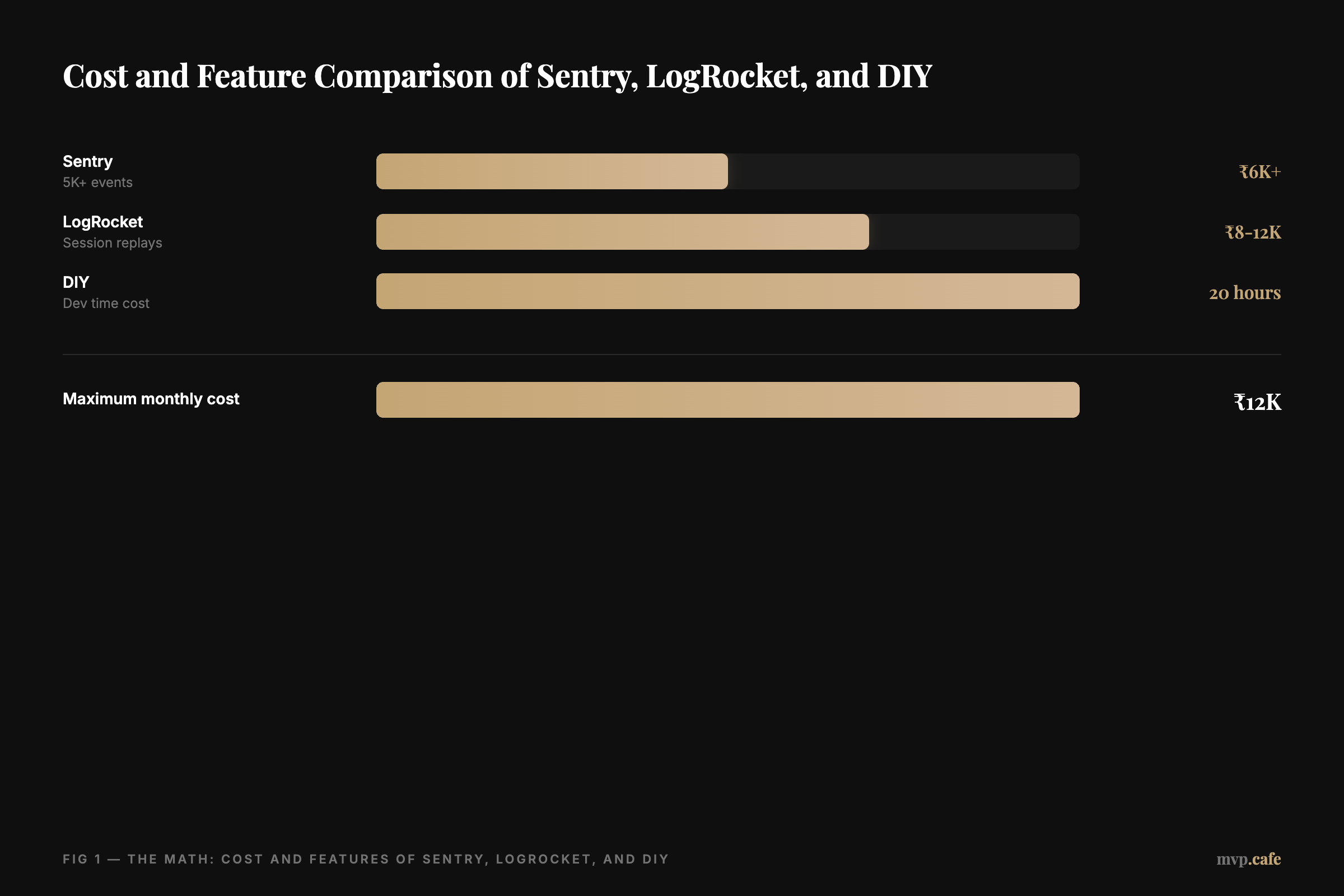
Let’s break down the costs. Sentry’s free tier is good until you hit around 5K monthly events. After that, it’s ₹6K+ a month. If your app’s error rate is high, the costs can climb quickly. But you do get performance metrics and a user-friendly dashboard.
LogRocket also has a free tier, but it’s quite limited in sessions. Paid plans can reach ₹8-12K monthly if you need thorough session replays. This gives you front-end monitoring and user sessions—a lifesaver for UX debugging.
DIY error tracking might not have monthly fees, but it’s not free. You invest hours building a logger, setting up storage, alerts, and a real-time log interface. If you’re already maxed out on dev hours, this can come back to bite you.
In my time at Fourzip, we managed 10K+ vehicles and needed to handle tens of thousands of location updates. A homegrown solution can work if you’ve got the engineering team, but for solo founders, it’s a tough road. Consider those subscription costs against the risk of a homemade solution going wrong.
When Sentry Wins: Ideal Scenarios for Startups
Sentry is the go-to if you want fast error tracking without a headache. It covers both the back-end and front-end, so all exceptions are in one spot. You get alerts, GitHub integration, and a streamlined workflow to deal with issues before they blow up.
At GoMechanic, error reporting was vital. Efficient systems kept things running smoothly. Nobody wants to find out about a website crash from an angry user’s comment. Sentry’s Stack Traces landing in your Slack channels means no more guesswork.
If your product handles lots of events—think thousands of requests per hour—Sentry’s performance insights can pinpoint slow endpoints. That’s crucial for user happiness. More real-time data means fewer surprises. Crucial when testing new releases. Push code, catch anomalies, fix fast. Less stress, more progress.
Sentry’s a solid choice if you’ve got the budget for its paid tiers and need a single dashboard for everything. Ideal if custom dashboards send you running for the hills. For a deeper dive, check out how this helped at GoMechanic.
When LogRocket Wins: Ideal Scenarios for Startups
LogRocket is all about context. It records user sessions, letting you see how users hit those tricky UI bugs. Perfect for MVPs with complex user journeys. Instead of wading through logs, watch a replay. It shows user clicks, mouse moves, and when errors appear.
Of the 45+ products I’ve shipped, many could’ve used this clarity. At ZYOD, reproducing user problems with intricate sewing machine data was a challenge. Seeing it happen saves time. If you’re the lone developer doubling as QA, this is gold.
LogRocket matches errors with front-end performance metrics. You’ll know if a user left because of a 5-second load time or a JavaScript crash. That’s the kind of insight you need for prioritization. But it comes at a price. If you’re tracking thousands of sessions, either limit your coverage or pay more.
Pick LogRocket if your focus is front-end issues. Or if vague bug reports drive you crazy. A clear user timeline is invaluable. Just remember, more sessions mean more expenses. But if it prevents a meltdown, it’s money well spent.
When DIY Wins: Ideal Scenarios for Startups
Sometimes full control is what you’re after. DIY error tracking is great if you’re at ease setting up infrastructure. Maybe you already run a local Elasticsearch or have an alert system. Linking a custom logger to Slack notifications can be satisfying.
Cost-wise, there’s no monthly fee. But you pay in time. Structure your logs, set up a good viewer, and manage alerts effectively. If you’re a solo founder into hacking, it might be enjoyable. But if dev-ops isn’t your thing, steer clear.
DIY is perfect if your MVP is small and errors are few. No need for fancy replays, just track exceptions. Scale as you grow. But if your user base spikes and logs hit 10K events daily, rethink your approach. Prepare for that.
If you’re up for a challenge, give DIY a go. Just have a backup plan for when your MVP outgrows your setup.
What I’d Do: Recommendations for Solo Founders
First, check your user load. Expecting 500 active users or 50,000? On the smaller side, consider a low-tier Sentry or LogRocket plan. Or DIY until you scale.
Next, think about session replays. If your MVP is laden with user interaction, LogRocket’s replays might save you hours weekly. If back-end logic and performance are your main issues, Sentry’s the way to go. For a tight, single-purpose MVP, DIY could keep costs low.
Finally, do you want to babysit your logging system? If yes, DIY. If not, pay for convenience. If you’re flying solo, time is your biggest asset. Spending 20 hours on a homemade solution might not be worth it. Choose a tool that lets you focus on features. That’s the MVP game—speed and learning.
When you’re set to equip your MVP with solid error tracking, look at our MVP build service. I’ve built enough 0→1 products to know an extra ₹6K or ₹8K often beats the hours lost chasing “undefined variable” bugs.
FAQs: Common Concerns and Misconceptions
Q1: What is the best error tracking tool for MVPs?
It depends on your MVP’s complexity and budget. Sentry has robust event tracking, while LogRocket excels in user session replays. DIY is cheap but requires more dev effort.
Q2: How does Sentry compare to LogRocket?
Sentry focuses on errors and performance metrics. LogRocket records user interactions and helps recreate issues visually. Both have free trials but vary in pricing tiers.
Q3: Can I create a DIY error tracking system?
Yes. If you have dev capacity, a self-built logger plus alerting stacks can work. But it demands time and ongoing maintenance.
Q4: What are the benefits of error tracking in MVPs?
You spot bugs faster, reduce user churn, and keep your engineering team sane. It’s a must-have for quick fixes and stable rollouts.
Q5: How do I choose between Sentry, LogRocket, and DIY?
Compare dev resources, budget, and product complexity. If you can handle your own logging and triage, DIY might suffice. Otherwise, pick a paid tool for time savings.