Most MVPs start with one user type: “the person who signed up.”
That is fine.
Then the first serious customer asks:
- Can my operations person see this but not edit it?
- Can my finance person download reports but not invite users?
- Can my client view progress without seeing internal notes?
- Can I remove an employee without deleting their history?
Suddenly your simple MVP has an access-control problem.
The mistake is not delaying roles. The mistake is adding the wrong roles too early, hardcoding them everywhere, and turning a simple product into a permission maze before users have even proved the workflow matters.
This guide gives you a practical middle path.
The Founder Rule: Delay Roles Until Collaboration Appears
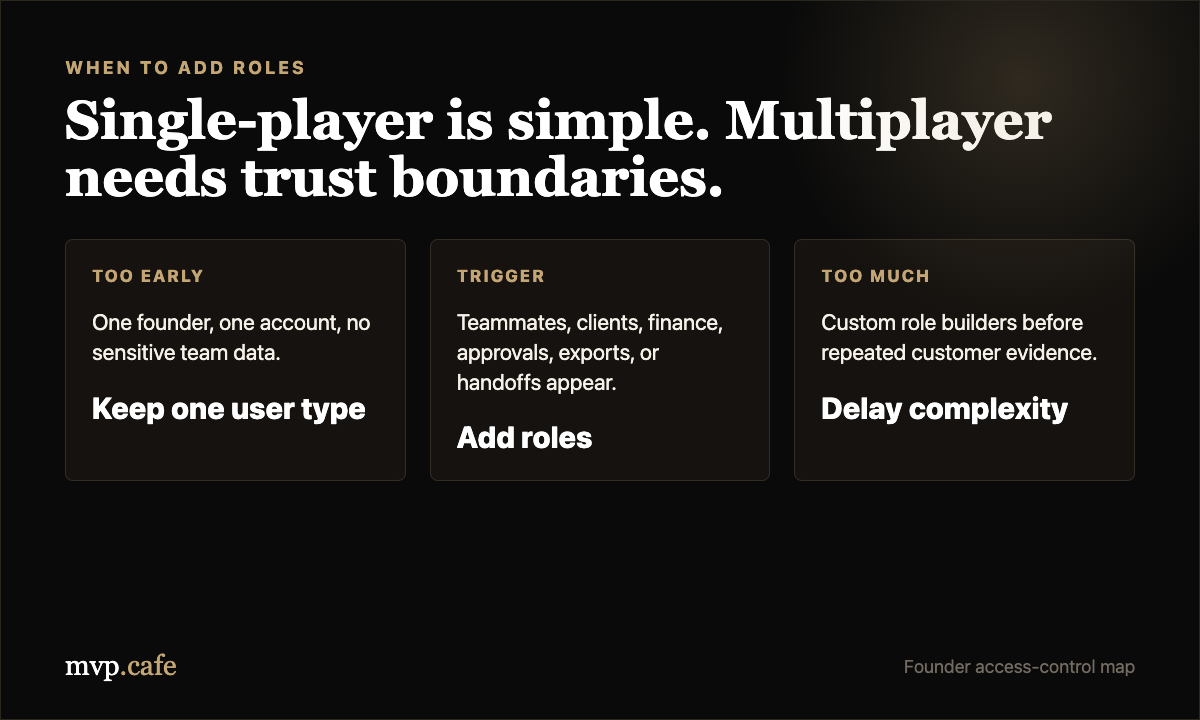
If your MVP is single-player, do not build a permissions system.
Single-player means one person signs up, creates records, views records, and owns the account. In that stage, “authenticated user can manage their own stuff” is enough.
Roles become useful when your product becomes multiplayer:
- A founder invites a teammate.
- A manager wants reports but not configuration access.
- A customer wants an external viewer.
- A workflow has approvals, handoffs, or audit trails.
- A business account has multiple people but one shared workspace.
That is the trigger. Not because “real SaaS has roles.” Not because a competitor has an enterprise admin panel. Because collaboration creates different levels of trust.
The Four Roles That Cover Most Early B2B Products
For an early B2B SaaS MVP, start with four roles:
1. Owner
The owner controls the workspace.
They can manage billing, delete the workspace, transfer ownership, invite admins, and access everything. There should usually be one owner per workspace, or a very deliberate ownership-transfer flow.
2. Admin
Admins run the product day to day.
They can invite members, manage settings, create core records, edit most data, and handle operational work. They should not be able to delete the entire account or transfer ownership unless there is a strong reason.
3. Member
Members do the normal work.
They can create and edit the things they are responsible for. They should not manage users, billing, workspace settings, or dangerous configuration.
4. Viewer
Viewers can see selected information.
They are useful for clients, leadership, advisors, auditors, or read-only internal stakeholders. The viewer role prevents the ugly workaround where founders share admin logins because “they only need to see one thing.”
That is enough for most MVPs.
If you think you need seven roles, you probably need better product boundaries, not more roles.
What Each Role Should Actually Control
The clean way to think about permissions is not by screens. Think by actions.
Can this role:
- Invite users?
- Remove users?
- Change settings?
- Create records?
- Edit records?
- Delete records?
- Export data?
- View sensitive fields?
- Approve or reject something?
- Manage integrations?
Once you list actions, the role model becomes easier to reason about.
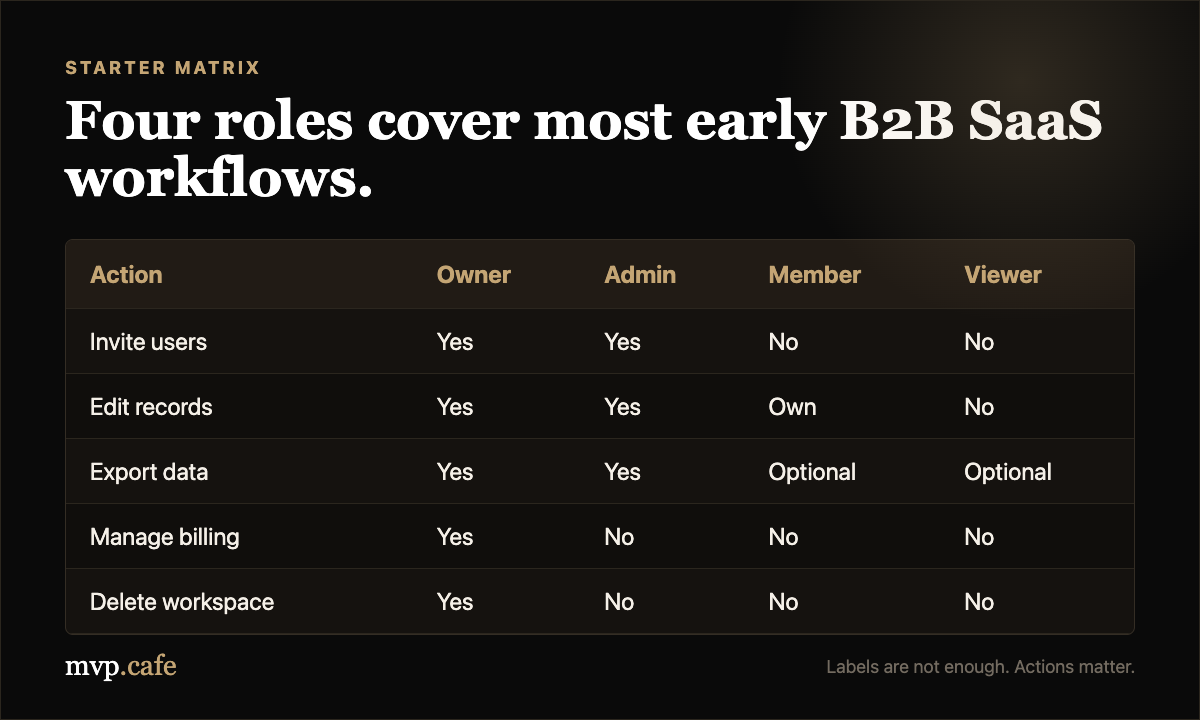
Here is the starter matrix I would use:
| Action | Owner | Admin | Member | Viewer |
|---|---|---|---|---|
| View workspace data | Yes | Yes | Yes | Limited |
| Create core records | Yes | Yes | Yes | No |
| Edit core records | Yes | Yes | Own records | No |
| Delete core records | Yes | Yes | Limited | No |
| Invite users | Yes | Yes | No | No |
| Remove users | Yes | Yes | No | No |
| Change workspace settings | Yes | Yes | No | No |
| Export data | Yes | Yes | Optional | Optional |
| Manage billing | Yes | No | No | No |
| Delete workspace | Yes | No | No | No |
The exact rows will change by product. The habit matters more than the template.
The Dangerous Shortcuts
Some shortcuts are fine. These are not.
Shortcut 1: One Shared Admin Login
This is common in early products.
It is also a quiet disaster.
You lose the ability to know who changed what. You cannot safely remove one person. You cannot debug customer complaints. You cannot trace accidental deletes. And if the password leaks, every action looks like it came from the same person.
Use invites and individual accounts early. Even if the permission model is simple, user identity should not be shared.
Shortcut 2: Checking Roles Only in the UI
Hiding a button is not access control.
If the backend still accepts the action, someone can call the API directly. The UI should guide the user, but the server should enforce the rule.
The minimum viable rule:
Every sensitive action should be checked on the backend before it runs.
Shortcut 3: Sprinkling Permission Logic Everywhere
This is how MVPs become brittle.
One file says admins can export. Another file says only owners can export. A third endpoint forgot to check. Now the product behaves differently depending on where the user clicked.
Centralize the logic.
Even a basic helper is better than scattered checks:
can(user, "export_reports", workspace)
can(user, "invite_user", workspace)
can(user, "delete_record", record)
The implementation can be simple. The important thing is that the product has one place to answer, “Can this person do this?”
Shortcut 4: Deleting Users Instead of Deactivating Them
Never erase a user just because they left a company.
Deactivate the account. Keep the history. Show their name on past actions. Prevent future login.
This matters for audit trails, customer trust, and debugging.
The MVP Version: Keep It Boring
You do not need enterprise RBAC on day one.
You need a small, boring model that can grow without a rewrite.
The MVP version can be:
- Workspaces or organizations
- Users
- Memberships
- A role on each membership
- Backend checks for sensitive actions
- A simple audit trail for important changes
That is it.
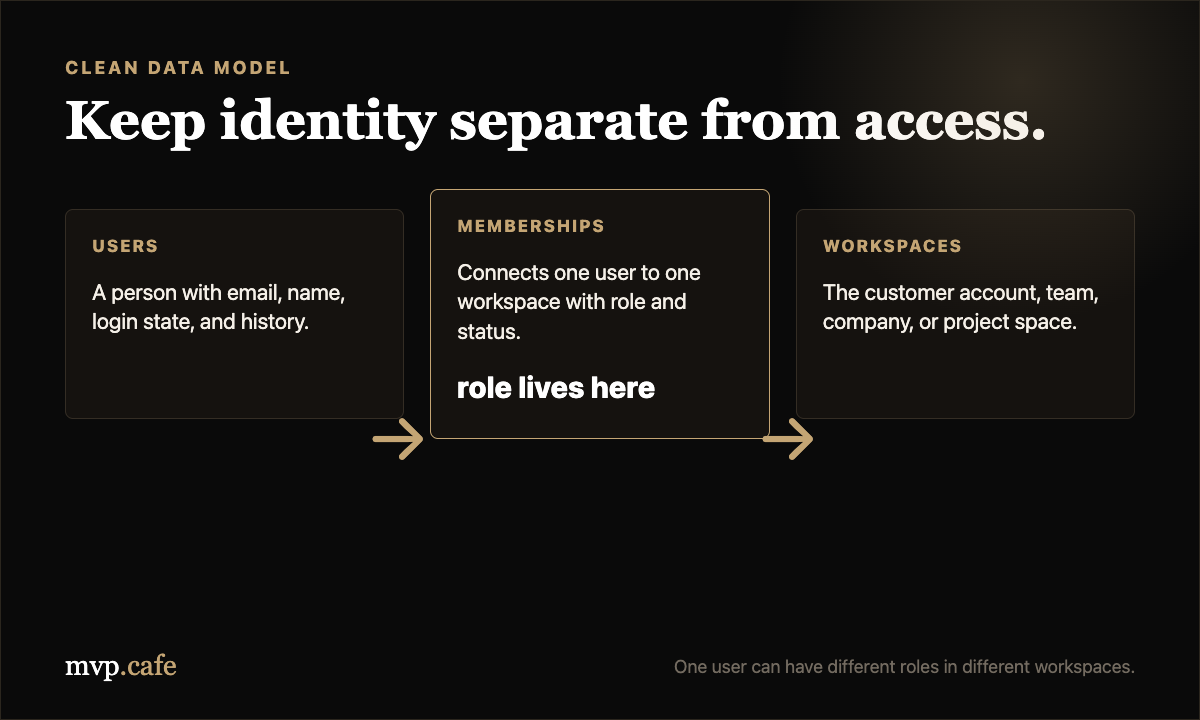
The important concept is membership.
A user is a person. A workspace is the customer account. A membership connects the person to the workspace and stores their role.
This gives you flexibility later.
One user can belong to multiple workspaces. A consultant can be admin in one workspace and viewer in another. An employee can leave one company without deleting their personal user record.
The Clean Data Model
For most early SaaS products, this is enough:
users
- id
- name
- email
- created_at
- deactivated_at

workspaces
- id
- name
- owner_user_id
- created_at

memberships
- id
- user_id
- workspace_id
- role
- status
- invited_by_user_id
- created_at

audit_events
- id
- workspace_id
- actor_user_id
- action
- target_type
- target_id
- created_at
Notice what is missing:
- No complex permission tables.
- No custom roles.
- No per-field permission editor.
- No enterprise policy engine.
Those can come later if customers demand them. Most MVPs never need them.
The Screens You Actually Need
You do not need a giant admin console.
You need five surfaces:
1. Team Page
Shows current members, roles, invite status, and basic actions.
2. Invite Flow
An admin enters an email, chooses a role, and sends an invite.
3. Role Change Control
Admins can change Member to Viewer or Viewer to Member. Owners can promote admins. Protect ownership changes carefully.
4. Remove Access
Removing access should deactivate membership, not erase history.
5. Permission Error State
When someone tries to access something they cannot, show a clear message. Do not silently hide everything and make the product feel broken.
Plain copy works:
You do not have permission to export reports. Ask an admin for access.
That one sentence prevents support tickets.
When to Add Custom Roles
Custom roles sound powerful. They are usually a trap in early products.
Add them only when:
- At least three customers ask for different role combinations.
- The same request keeps coming up in sales or onboarding.
- The workaround is causing real churn or security risk.
- Your default roles cannot map to how the customer’s team works.
Do not add custom roles because one prospect said, “It would be nice if…”
That phrase has eaten more roadmap time than most bugs.
The Access-Control Checklist
Before you call your MVP ready for team use, check this:
- Every user has their own account.
- Every business account has a workspace or organization record.
- Access is stored through memberships, not just a field on the user.
- Owner, Admin, Member, and Viewer are clearly defined.
- Sensitive actions are enforced on the backend.
- Dangerous actions require confirmation.
- Removed users cannot log in, but history remains visible.
- Exports are treated as sensitive.
- Permission errors are human-readable.
- Important actions create audit events.
If this list passes, your MVP is in a good place. Not enterprise-ready. Just sane.
Sane is underrated.
The Bottom Line
Roles and permissions are not a feature you build because SaaS products are “supposed to have them.”
They are a trust boundary.
Build them when collaboration creates different levels of trust. Start with four roles. Keep the checks on the backend. Store access through memberships. Avoid custom-role complexity until repeated customer evidence forces it.
That gives you enough structure to sell to teams without dragging your MVP into enterprise admin-panel hell.